
Dynamic Shipping Model
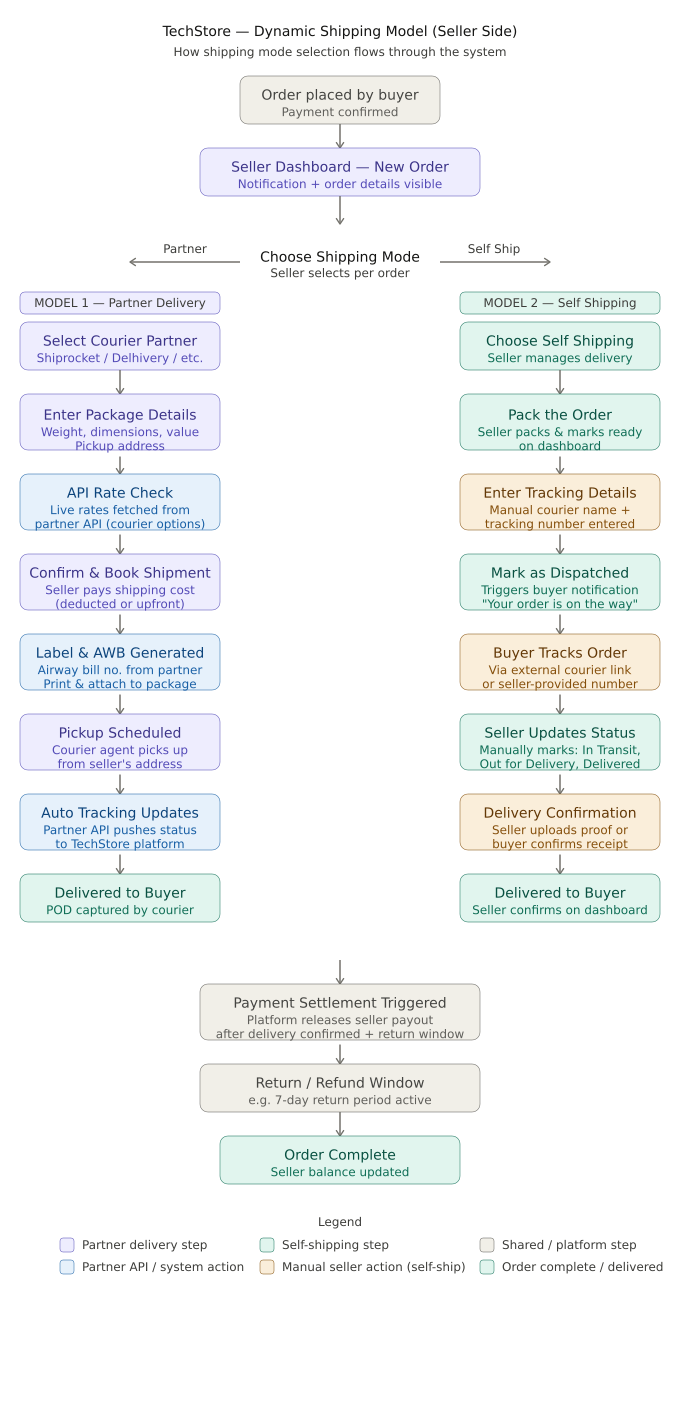
Here's the full Dynamic Shipping Model diagram for your TechStore Expo app. Let me break down how each model works:
Model 1 — Partner Delivery (Shiprocket / Delhivery / etc.)
The seller picks a courier partner, enters package details (weight, dimensions, pickup address), and your app hits the partner's API to fetch live shipping rates. The seller confirms and books — the cost is either deducted from their balance or charged upfront. The partner API auto-generates an AWB (Airway Bill Number) and label. A pickup is scheduled, the courier collects from the seller, and tracking updates are automatically pushed back into TechStore via webhook. No manual effort needed after dispatch.
Model 2 — Self Shipping
The seller handles everything themselves. They pack the order, enter their own courier's tracking number manually (e.g. DTDC, India Post, local courier), and mark it as dispatched. From here, it's manual — the seller updates the status at each stage (In Transit → Out for Delivery → Delivered) and uploads proof of delivery or the buyer confirms receipt.
Shared Flow (after delivery)
Both models merge at the same endpoint — delivery confirmation triggers the platform's payment settlement, holding the payout until the return window closes, then releasing to the seller's balance.
Key things to build in Expo for this:
A shipping mode selector on the Order detail screen (Partner vs Self-Ship toggle)
Shiprocket/Delhivery API integration for live rate fetching + AWB generation
A manual tracking entry form for self-ship orders
Webhook listener on your backend to receive partner tracking events
Seller dashboard with order status pipeline view